
Ask an AI assistant to describe your company and read the answer closely. There is a strong chance it has blended you with a namesake in another jurisdiction, a dissolved predecessor, or a subsidiary it has mistaken for the parent. The assistant did not invent the confusion, instead it most likely inherited it from the web, where most company websites never state which legal entity the site belongs to.
If your organisation holds a Legal Entity Identifier, you already own the fix: put the LEI in your website’s structured data, the machine-readable block that search engines and AI assistants read to learn who a site belongs to. Every LEI record on RapidLEI’s LEI Search now has a Connect this LEI to your Website button that produces that block for you, prefilled from your official LEI record. Copy it, hand it to whoever runs your website, and your company becomes a verified entity in their indexes. This post explains what the problem is, why the LEI solves it, and what the block contains.
Search engines and AI assistants are guessing
Google, Bing and all the AI assistants do not know your company. They build a model of it from whatever they can find: your website, the business register, Wikipedia, news coverage, directories, review sites. All those datapoints are then reconciled into one picture.
The reconciliation is where things can go wrong. Suppose your company is Meridian Capital Limited in London. There is a Meridian Capital in New York, another in Sydney, a Meridian Capital Partners, and a Meridian Capital Group that closed in 2019. A news story mentions “Meridian Capital” without a country. A directory lists your address under the wrong one. The engine has to decide which Meridian is which, and it decides on probability and other rules in its algorithm. Sometimes it is wrong, and the error shows up in a knowledge panel, an AI answer, or a KYB onboarding screen.
Names are not identifiers. They are shared, they change, and they are written differently on every document. What the engines need is a code that belongs to exactly one legal entity and that someone independent has checked.
That code exists, it’s called an LEI, and you may already have it
The Legal Entity Identifier (LEI) is a 20-character code assigned to one legal entity and no other. It was created after the 2008 financial crisis, when regulators found they could not reliably identify the parties to a transaction. It is now required by regulators across the world for securities trading, derivatives, payments and an increasing range of other activities, and more than three million organisations hold one.
The record behind each LEI is public. It holds the registered legal name, address, jurisdiction, business register number, and whether the entity is active. For most entities it also holds who the parent company is. The record is checked against the business register every year (or potentially more often) when the LEI is renewed, which is what makes it more useful than a name: it is verified, and it stays verified. The data held in the record is described in LEI reference data.
What most organisations have not done is tell the web about it. It is absent from the one place every search engine and AI assistant reads first, which is the company’s own website.
Telling the web who you are
Websites carry a second layer of information, written for machines. Search engines use this structured data to read facts about a page. For a company homepage, that layer typically states the organisation’s name, logo, address and social profiles.
The vocabulary websites use for this, called schema.org, has had a field for the LEI since GLEIF, the foundation that governs the LEI system, contributed it. Google lists the LEI among the identifiers it reads to tell organisations apart. The mechanism is already in place on both sides: your site can state the LEI, and the engines are listening for it.
The AI side matters more every day. Answer engines such as Google’s AI Overviews, Perplexity and ChatGPT search do not read your website at the moment someone asks a question; they retrieve from an index of entities they have already built, then write an answer around what they retrieved. Structured data is one of the inputs that index is built from. An organisation with a verified identifier in its markup is a distinct, resolvable entity in that index. An organisation without one is a name string the engine has to disambiguate every time.
RapidLEI makes a convenient example because the block is live on rapidlei.com now. Every value comes from the LEI record of Ubisecure, the company that operates RapidLEI and is the GLEIF-accredited LEI Issuer behind it:
{
  "@context": "https://schema.org",
  "@type": "Organization",
  "name": "RapidLEI",
  "legalName": "Ubisecure Oy",
  "url": "https://rapidlei.com/",
  "leiCode": "529900T8BM49AURSDO55",
  "iso6523Code": "0199:529900T8BM49AURSDO55",
  "sameAs": [
    "https://rapidlei.com/lei-record/529900T8BM49AURSDO55/",
    "https://search.gleif.org/#/record/529900T8BM49AURSDO55"
  ]
}
Each line maps to something a verifier can check. The trading name and the registered legal name come from the LEI record. The LEI appears twice: leiCode is the field schema.org created for the LEI, and iso6523Code is the general-purpose identifier format Google’s current guidance asks for, where the prefix 0199 is the international code designator that marks the value as an LEI. Including both satisfies the schema.org vocabulary and Google’s Organization guidelines at once. The two sameAs links point at the public record, on RapidLEI and on the GLEIF register, so anyone can confirm the entity is real, active and matches the name. Nine lines, and a search engine knows precisely which company runs rapidlei.com. The full version on the live site adds the address, contact details, the parent company and the GLEIF accreditation, all from the same record.
Once it is live, a developer can paste the page URL into Google’s Rich Results Test or the Schema Markup Validator and see the identifier read back within seconds.
When the LEI is present, the engine no longer has to guess which Meridian Capital you are. It has a verified code, it can look up the record, and it can match your site to the entity on the register. Every other source that mentions the same LEI, including the register itself, reinforces the match. The picture it builds of your company starts from a fact.
Connecting your LEI to your website
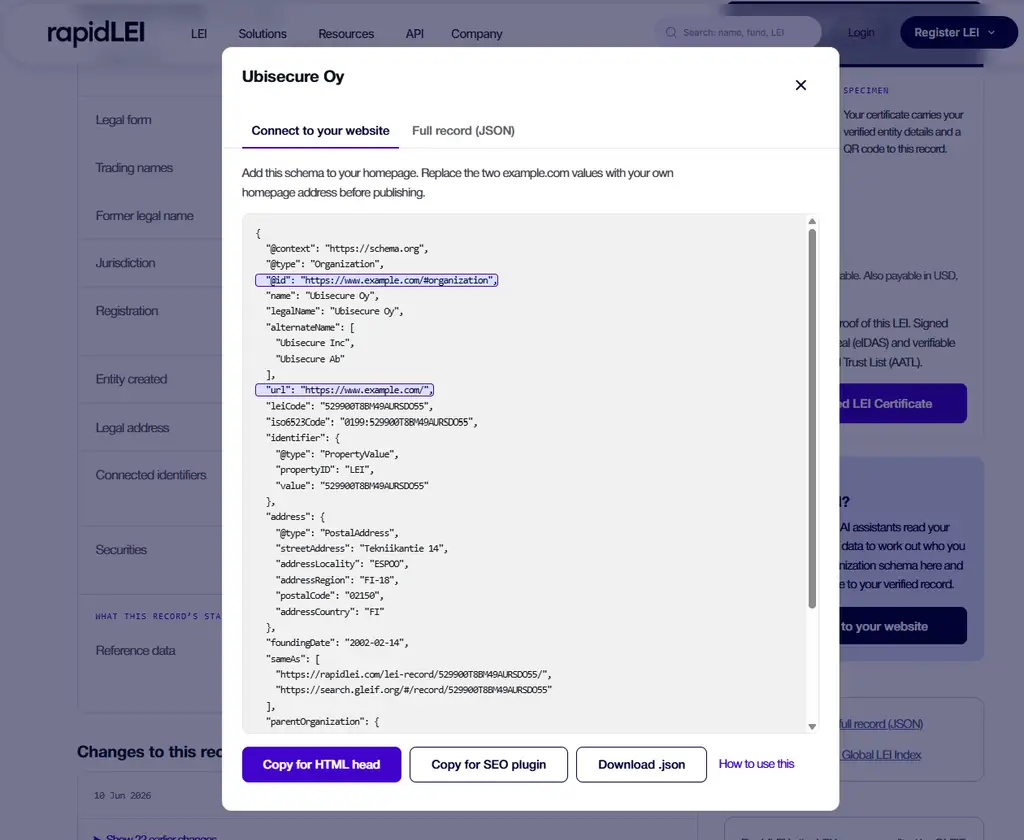
Every LEI record on rapidlei.com has a button labelled Connect this LEI to your website. It produces a block like the one above for your organisation, prefilled from your record, with your website address left for you to fill in.
Open LEI Search and find your organisation.
On the record page, click Connect this LEI to your website.
Copy the result, or download it, and send it to whoever runs your website with a link to the technical guide. It tells them where it goes on WordPress, Shopify, Webflow, HubSpot, Squarespace or a hand-built site, and how to check it worked.
The guide also covers a second, equally quick step: adding the LEI to your company’s Wikidata entry if you have one, which Google’s Knowledge Graph reads directly.
If you do not have an LEI yet
Without an LEI, your organisation is missing the global identifier that search engines, AI assistants, banks and regulators all recognise, and every one of them is reconciling you by name, where collisions may occur. Registration takes a few minutes, most LEIs are issued the same day, and the record is live in the Global LEI Index from that point.
Register an LEI and the Connect this LEI to your website button is waiting on your record page.
Frequently asked questions
Our group has several companies and one website. Whose LEI goes on it?
The LEI of the legal entity that owns and operates the site, which is usually the entity named in the site’s legal footer or terms. The markup can then name that entity’s parent, taken from the LEI record’s ownership data, so the group relationship is stated as well. The ownership data comes from Level 2 data in the LEI record. The technical guide shows the parent and subsidiary form.
Does the LEI go on every page or only the homepage?
The homepage, or the About page if that is where the organisation’s details live. The block describes the organisation, so it belongs once, on the page that represents the organisation. Repeating it on every page adds nothing and gives you more copies to keep consistent.
We trade under a different name from our registered one. Which do we use?
Both. The registered legal name goes in legalName, exactly as it appears in the LEI record, because that is what a verifier compares against the register. The trading name goes in name. The RapidLEI example above does exactly this: RapidLEI is the trading name, Ubisecure Oy the registered one.
What if our LEI record is out of date?
Fix the record first. The markup should match the record, and the record is what a verifier trusts. If the registered address or legal name has changed, update the LEI through your LEI Issuer; the change is corroborated against the business register and published to the Global LEI Index, and then the markup can follow.
Find your record in LEI Search, click Connect this LEI to your website, and give the web the one fact about your company it cannot get wrong.
References
- GLEIF, Introducing the Legal Entity Identifier
- Schema.org, leiCode property
- Google Search Central, Organization structured data
- GLEIF, Global LEI Index
- RapidLEI, How to add your LEI to your website’s structured data