

Your Legal Entity Identifier is the only globally unique, independently verified identifier your organisation has. Stating it in your website’s Organization structured data tells search engines and AI assistants exactly which legal entity owns the site. This article gives the markup, the properties that matter, where to put it on common platforms, how to validate it, and the faults we found on our own site while doing the same job.
Why the LEI belongs in structured data
Search engines and AI assistants assemble a picture of your organisation from your website, business registries, Wikipedia and Wikidata, news, and directories. Where those sources disagree, or where several organisations share a name, the engines guess. A company called Meridian Capital in London is one of dozens of Meridian Capitals worldwide, and nothing on a typical website says which one it is.
Structured data resolves that. It is a block of JSON-LD in the page’s HTML that states facts about the organisation in the schema.org vocabulary. Search engines and AI assistants read schema.org structured data to identify organisations. Schema.org’s Organization type has a property called leiCode, defined as “an organization identifier that uniquely identifies a legal entity as defined in ISO 17442”, the LEI standard. GLEIF contributed the property and it sits in core schema.org.
Google’s Organization structured data documentation lists leiCode, iso6523Code, duns, vatID, taxID and naics as recommended identifier properties and says some “are used behind the scenes to disambiguate your organization from other organizations”. Google prefers identifiers in the iso6523Code form. The LEI has an ISO 6523 International Code Designator, 0199, so the same LEI can be expressed both ways, and the markup below does.
When a bank, supplier or customer asks an AI assistant about your organisation, the answer then draws on a record tied to a verified identifier instead of a name match. For organisations with common names, group structures or recent rebrands, that is the difference between being described correctly and being confused with someone else.
The fast route: copy it from your LEI record
Every LEI record on rapidlei.com can generate your Organization schema for you, prefilled from the verified record.
- Go to LEI Search and search for your organisation by name or LEI.
- Open your LEI record. In the sidebar, under Is this your LEI?, select Connect it to your website.
- If your group’s subsidiaries hold LEIs and you want them listed, tick Include subsidiaries. It is off by default, because a subsidiary list goes out of date with every acquisition or disposal, so only include it if you will keep it current.
- Replace the two example.com values,
@idandurl, with your own homepage address. They are highlighted in the code. - Choose how to add it:
- Copy for HTML head gives you a complete script tag to paste into your homepage’s .
- Copy for SEO plugin gives you the JSON only, for custom schema fields in plugins such as Rank Math or Yoast.
- Download .json gives you a file to send to your web developer.
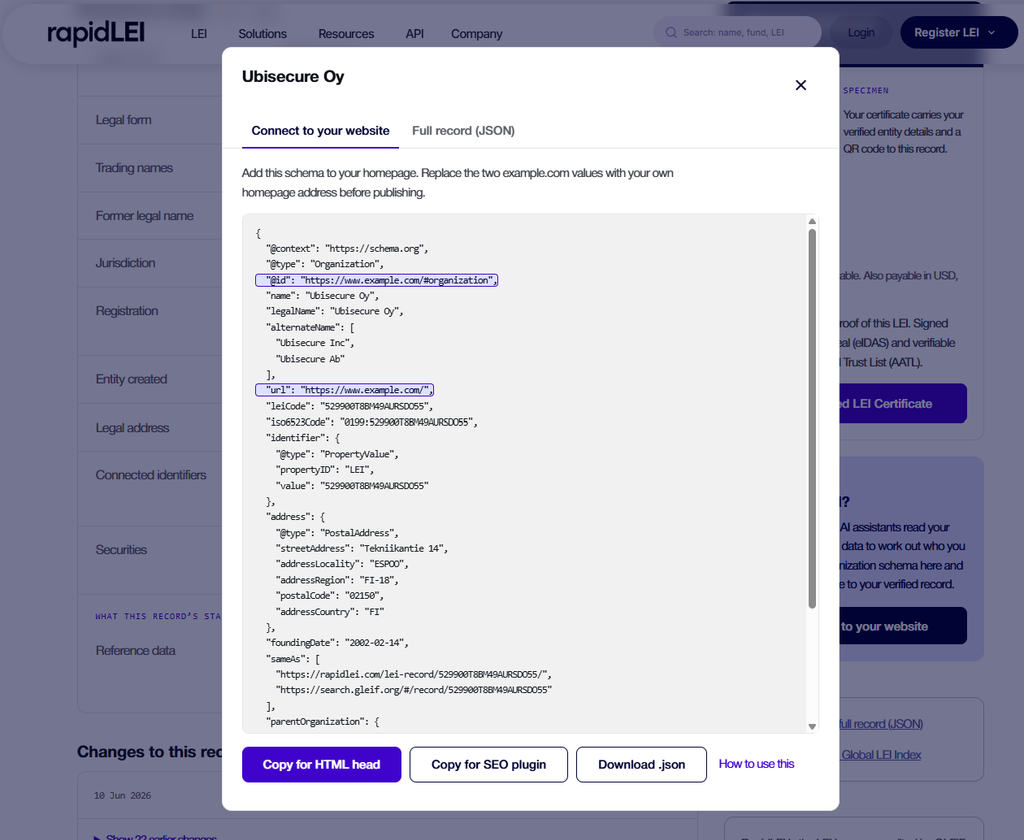
The schema includes:
- your legal name and any trading names
- your LEI as
leiCode,iso6523Codeandidentifier - your headquarters address
- your founding date
sameAslinks to your RapidLEI record and your GLEIF record- your direct parent, where GLEIF reports one
If your LEI has lapsed, the dialog asks you to renew it before you publish. Markup pointing to a lapsed record tells search engines the data has not been revalidated. If your LEI is retired or a duplicate, no schema is offered, and the dialog links to the LEI that replaces it.
The examples in the rest of this guide use ubisecure.com. Read on if you need to add the LEI properties to an Organization node your website already publishes, or want to know what each property does.
What to add
The markup belongs in the <head> of the homepage or About page, inside <script type="application/ld+json">. Most sites already emit an Organization node from an SEO plugin; add the identifier properties to that node; a second node causes the collision described under Faults to avoid.
The example is Ubisecure Limited, the UK operating company of the Ubisecure group, whose website is ubisecure.com. Every value is taken from its LEI record (9845002DCB1C8AF9EB21) as published by GLEIF on 6 October 2026. Replace every value with your own.
Single organisation
{
  "@context": "https://schema.org",
  "@type": "Organization",
  "@id": "https://www.ubisecure.com/#organization",
  "name": "Ubisecure",
  "legalName": "UBISECURE LIMITED",
  "url": "https://www.ubisecure.com/",
  "leiCode": "9845002DCB1C8AF9EB21",
  "iso6523Code": "0199:9845002DCB1C8AF9EB21",
  "identifier": {
    "@type": "PropertyValue",
    "propertyID": "LEI",
    "value": "9845002DCB1C8AF9EB21"
  },
  "address": {
    "@type": "PostalAddress",
    "streetAddress": "Unit L3/12 Vinters Business Park, New Cut Road",
    "addressLocality": "Maidstone",
    "addressRegion": "Kent",
    "postalCode": "ME14 5NZ",
    "addressCountry": "GB"
  },
  "sameAs": [
    "https://rapidlei.com/lei-record/9845002DCB1C8AF9EB21/",
    "https://search.gleif.org/#/record/9845002DCB1C8AF9EB21",
    "https://opencorporates.com/companies/gb/10431233",
    "https://www.linkedin.com/company/ubisecure/"
  ]
}
Property by property:
leiCode: the 20-character LEI exactly as it appears in the record, upper case, no spaces.iso6523Code: the form Google asks for.0199:is the ISO 6523 designator for the Global LEI System, followed by the LEI. Schema.org documents the format asXXXX:YYYYYY.identifier: a PropertyValue withpropertyID“LEI” for parsers that do not knowleiCode. One extra object, no cost.legalName: the registered name as held in the LEI record, matching case and suffix.namecarries the name the organisation trades under; here “Ubisecure”. If the record lists trading names or alternative-language legal names, add them as analternateNamearray.sameAs: where the authoritative public records of the entity live. The OpenCorporates URL is built from the OpenCorporates identifier held in the LEI record (gb/10431233), which resolves to Companies House number 10431233. The RapidLEI record page shows the full GLEIF record with status, renewal date and ownership in plain language and carries its own structured data for the entity. The GLEIF record is the registry’s own view. OpenCorporates is appropriate where the LEI record holds an OpenCorporates identifier. Add LinkedIn and Wikipedia where they exist. Always an array, even with one entry.
Parent and subsidiary
If the site represents a group, state the relationship. Each entity holds its own LEI, and the record’s Level 2 data already says who consolidates whom, so the markup should agree with it. The example states the direct accounting parent recorded in Ubisecure Limited’s LEI record. The managing LEI Issuer shown on a record is a different relationship and does not belong in parentOrganization. Schema.org has no property for the ultimate parent; state the direct parent only.
{
  "@context": "https://schema.org",
  "@type": "Organization",
  "@id": "https://www.ubisecure.com/#organization",
  "name": "Ubisecure",
  "legalName": "UBISECURE LIMITED",
  "url": "https://www.ubisecure.com/",
  "leiCode": "9845002DCB1C8AF9EB21",
  "iso6523Code": "0199:9845002DCB1C8AF9EB21",
  "sameAs": [
    "https://rapidlei.com/lei-record/9845002DCB1C8AF9EB21/",
    "https://search.gleif.org/#/record/9845002DCB1C8AF9EB21"
  ],
  "parentOrganization": {
    "@type": "Organization",
    "name": "Ubisecure Holdings Limited",
    "legalName": "UBISECURE HOLDINGS LIMITED",
    "leiCode": "89450051ZRDOL9KEWH63",
    "iso6523Code": "0199:89450051ZRDOL9KEWH63",
    "sameAs": [
      "https://rapidlei.com/lei-record/89450051ZRDOL9KEWH63/",
      "https://search.gleif.org/#/record/89450051ZRDOL9KEWH63",
      "https://opencorporates.com/companies/gb/10408185"
    ]
  }
}
A parent’s site can list subsidiaries with subOrganization as an array of the same shape. Include only entities that hold an LEI, and keep the list to the subsidiaries you want engines to associate with the site; a group with hundreds of entities should link to a group-structure page and leave the homepage head light.
Where to put it
WordPress with Rank Math
Rank Math builds the Organization node from Titles & Meta, Local SEO. Set Legal Name to the registered name from your LEI record and Founding Date to the entity creation date (the LEI record shows it). Rank Math Pro has a field for the LEI code, which emits leiCode. There is no field for iso6523Code, identifier or an extra sameAs, so add those through the rank_math/json_ld filter. The snippet below targets the sitewide Organization node by its @id and adds the missing properties without touching anything Rank Math already sets.
add_filter( 'rank_math/json_ld', function ( $data, $jsonld ) {
	$lei    = '9845002DCB1C8AF9EB21'; // Your LEI.
	$org_id = home_url( '/' ) . '#organization';

	foreach ( $data as $key => $node ) {
		if ( ! is_array( $node ) || 'Organization' !== ( $node['@type'] ?? '' ) ) {
			continue;
		}
		if ( ( $node['@id'] ?? '' ) !== $org_id ) {
			continue;
		}
		$node['leiCode']     = $lei;
		$node['iso6523Code'] = '0199:' . $lei;
		$node['identifier']  = array(
			'@type'      => 'PropertyValue',
			'propertyID' => 'LEI',
			'value'      => $lei,
		);
		$same_as = (array) ( $node['sameAs'] ?? array() );
		foreach ( array(
			'https://rapidlei.com/lei-record/' . $lei . '/',
			'https://search.gleif.org/#/record/' . $lei,
		) as $url ) {
			if ( ! in_array( $url, $same_as, true ) ) {
				$same_as[] = $url;
			}
		}
		$node['sameAs'] = array_values( $same_as );
		$data[ $key ]   = $node;
	}
	return $data;
}, 30, 2 );
Install it as a code snippet or an mu-plugin. Do not add a second Organization through Rank Math’s per-page Schema Generator; see Faults to avoid.
WordPress with Yoast
Yoast’s Site representation settings produce the Organization node. Recent versions include identifier fields in the Premium version and the wpseo_schema_organization filter accepts the same additions as the Rank Math example, with the node passed directly rather than inside a graph array.
Other platforms
Shopify, Webflow, HubSpot and Squarespace each have a custom code or header scripts setting; paste the full JSON-LD block there. If the platform already emits an Organization node, give yours the same @id only if you can remove the platform’s node; otherwise use a different @id and accept that the two will be read as separate statements. Hand-built sites add the script block to the head of the homepage template.
Wikidata
If your organisation has a Wikidata item, add the LEI as a statement with property Legal Entity Identifier (P1278). Google’s Knowledge Graph reads Wikidata directly, so this is the most effective place outside your own site to assert the identifier. Search for the organisation at wikidata.org, open the item, add statement, property P1278, value the LEI. Creating an item is permitted for organisations that meet Wikidata’s notability bar, which is lower than Wikipedia’s.
How to check it worked
- Run the page through the Schema Markup Validator. It checks the full vocabulary, so
leiCodeandiso6523Codeare confirmed here. Expect zero errors. - Run it through Google’s Rich Results Test. The Organization node should show no errors. Identifier properties produce no rich result, so “no rich results detected” alongside a clean node is the right outcome.
- Confirm the page emits exactly one Organization node per
@idand one WebSite node. The validator lists every node; duplicates are the most common fault (see below). - Compare
legalName, status and parent against your record in LEI Search. A mismatch means either the markup or the record is wrong; fix whichever it is.
AI assistants pick it up as their sources refresh, with no published timescale.
Faults to avoid
We corrected these on rapidlei.com while preparing this article. Each is easy to introduce and invisible until you look at the raw graph.
Two Organization nodes with the same @id. SEO plugins let you add schema per page. Adding an Organization on the homepage that way, alongside the sitewide one, produces two nodes with identical @id and split the site’s identity. Parsers handle the collision inconsistently and Google will use one and discard the other with no guarantee which. Put every property in the one sitewide node.
Two WebSite nodes. The same mechanism, with a sharper consequence: if each carries a SearchAction with a different target, the sitelinks searchbox is ignored. One WebSite node, one action.
Entity-encoded ampersands. Custom schema entered through a plugin’s text field can come out with & inside URLs. A SearchAction target containing & is broken. Build URLs in code with wp_json_encode() or check the raw output after saving.
foundingDate set to the wrong event. The field is the organisation’s founding date. Accreditation, incorporation of a renamed successor, or the date the website launched are different facts. The LEI record’s entity creation date is the reference.
A stale legal name. legalName is what a verifier compares against the register. Copy it from the LEI record, which is corroborated against the register at each renewal.
What to do next
Keep the LEI active. An LEI lapses without annual renewal and the lapsed status is public. Markup that resolves to a lapsed record tells a verifier the organisation’s data has not been checked in over a year, which is worse than saying nothing. Multi-year registration with automatic renewal removes the risk; the renewal guide covers the options.
State the identifier wherever you state who you are. Email signatures, invoice templates, supplier onboarding forms and the legal footer of the website all gain from the LEI for the reason the markup does: the recipient has something to verify.